🤔 What is Atlas Sender v2? Understanding This Email Marketing Powerhouse
Atlas Sender v2 represents the latest evolution in Windows-based email marketing software, specifically designed for marketers, agencies, and businesses seeking complete control over their email campaigns without monthly subscription fees.
Atlas Sender v2 Core Specifications:
-
Platform: Windows Desktop Application (.NET 4.0+)
-
Latest Version: v2.0.2 (Released January 2025)
-
License Type: One-time Purchase with Lifetime Updates
-
Price: $18 (Standard License)
-
Support: 6 Months Included, Extendable to 12 Months
-
Author: Social-Rocket (Envato CodeCanyon)
-
User Rating: 4.53/5 Stars from 198+ Sales
Primary Use Cases for Atlas Sender v2:
-
Digital Marketing Agencies managing multiple client campaigns
-
E-commerce Businesses sending product updates and newsletters
-
Affiliate Marketers scaling promotional email outreach
-
Small Businesses needing professional email marketing on a budget
-
Software Resellers looking for white-label opportunities
✨ Atlas Sender v2 Features: What’s New & Improved?
🚀 Version 2.0.2 Major Updates (January 2025):
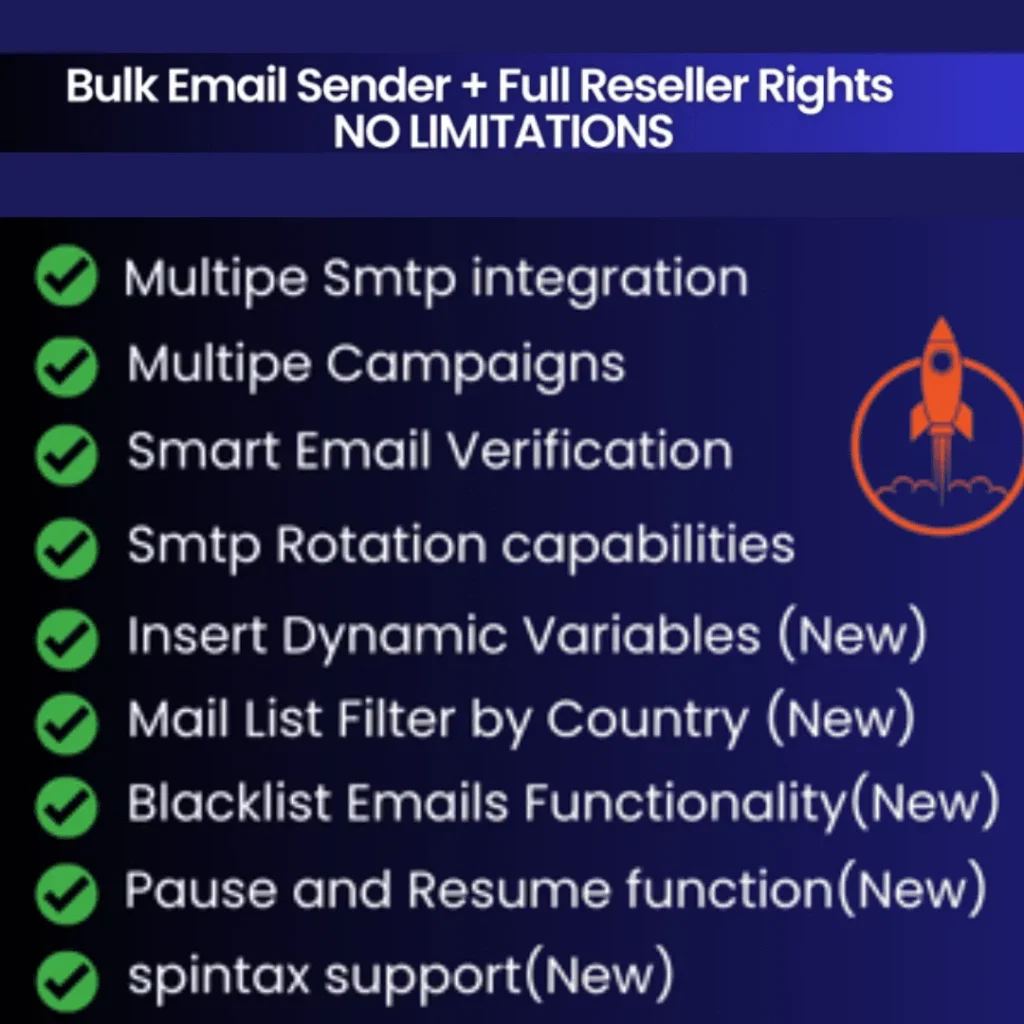
1. Dynamic Variables Insertion
Before: "Hi Customer"
After: "Hi {first_name}, your order #{order_id} is ready!"
-
Personalized email content at scale
-
Support for custom fields and data merging
-
Real-time variable replacement during sending
2. Enhanced Pause & Resume Functionality
-
Pause campaigns mid-execution without data loss
-
Resume from exact stopping point
-
Perfect for A/B testing adjustments
-
Emergency stop feature for compliance issues
3. Upgraded SMTP Tester Tool
-
Real-time server configuration validation
-
Connection speed testing
-
Authentication verification
-
Deliverability simulation before mass sending
🎯 Core Features That Set Atlas Sender v2 Apart:
✅ Unlimited SMTP Server Management
-
No restrictions on server count
-
Individual server performance monitoring
-
Automatic failover capabilities
-
Priority-based server selection
✅ Advanced Email Verification System
-
Domain-level verification before sending
-
Syntax checking and validation
-
MX record verification
-
Duplicate email removal
✅ Country-Specific Targeting
-
Filter email lists by country codes
-
Time-zone aware sending
-
Localization support
-
Geo-targeted campaign optimization
✅ Spintax Support for Content Variation
Example: "Hi {name}|Hello {name}|Dear {name},
your {product|item|purchase} is {ready|prepared|available}!"
-
Natural language variation
-
Reduced spam filter detection
-
Improved engagement through personalization
💡 Atlas Sender v2 Practical Applications: Real-World Scenarios
Case Study 1: E-commerce Business
Problem: 40% of promotional emails landing in spam
Solution with Atlas Sender v2:
-
Implemented 5-server SMTP rotation
-
Added country filtering for international customers
-
Used dynamic variables for personalized product recommendations
-
Result: 89% deliverability rate, 35% increase in email-driven sales
Case Study 2: Digital Marketing Agency
Problem: Managing 15+ client accounts with varying needs
Solution with Atlas Sender v2:
-
Created separate campaigns for each client
-
Used white-label features for client presentations
-
Implemented pause/resume for real-time adjustments
-
Result: Reduced management time by 60%, increased client retention
💰 Atlas Sender v2 Pricing Analysis: Is It Worth It?
Cost Comparison Table:
| Feature | Atlas Sender v2 | Mailchimp Pro | SendGrid | Constant Contact |
|---|---|---|---|---|
| Initial Cost | $18 one-time | $299/month | $89/month | $45/month |
| Monthly Fee | $0 | $299 | $89 | $45 |
| Email Limit | Unlimited | 150,000 | 100,000 | 50,000 |
| SMTP Rotation | ✅ Unlimited | ❌ | Limited | ❌ |
| White Label | ✅ (Reseller) | ❌ | ❌ | ❌ |
| Year 1 Cost | $18 | $3,588 | $1,068 | $540 |
| Year 3 Cost | $18 | $10,764 | $3,204 | $1,620 |
ROI Calculation Example:
Small Business Sending 50,000 Emails/Month:
- Atlas Sender v2: $18 (lifetime) + SMTP costs (~$30/month)
- Cloud Service: $150-$300/month
- Annual Savings: $1,200-$3,200
- Payback Period: < 1 month
\🔧 Atlas Sender v2 Setup Guide: Step-by-Step Implementation
Phase 1: Pre-Installation Preparation (Day 1)
-
System Requirements Check:
-
Windows 7/8/10/11 or Windows Server
-
.NET Framework 4.0 or higher
-
2GB RAM minimum (4GB recommended)
-
500MB free disk space
-
-
SMTP Account Acquisition:
-
Recommended: 3-5 different SMTP providers
-
Options: Amazon SES, SendGrid, Mailgun, Pepipost, or private servers
-
Budget: $10-$50/month depending on volume
-
Phase 2: Installation & Configuration (Day 2)
-
Download & Installation:
-
Purchase from CodeCanyon
-
Download installation package
-
Run setup.exe (admin rights recommended)
-
-
Initial Setup:
-
License key activation
-
SMTP server addition (minimum 2 servers)
-
Basic preferences configuration
-
Test email to verify setup
-
Phase 3: Campaign Creation (Day 3)
-
Email List Import:
-
Supported formats: CSV, TXT
-
Data cleaning recommendations
-
Segmentation strategy implementation
-
-
Template Design:
-
HTML or plain text options
-
Dynamic variable insertion
-
Spintax implementation for variation
-
Mobile-responsive design testing
-
Phase 4: Testing & Optimization (Day 4-7)
-
Small Batch Testing:
-
Start with 100-500 emails
-
Monitor deliverability and open rates
-
Adjust timing and content based on results
-
-
Performance Monitoring:
-
Track bounce rates (<2% target)
-
Monitor spam complaints (<0.1% target)
-
Analyze open and click patterns
-
Adjust SMTP rotation based on performance
-
🎯 Advanced SMTP Rotation Strategy with Atlas Sender v2
Optimal Server Configuration:
Recommended Setup for 10,000 Emails/Day:
- Primary Server (40% volume): Dedicated IP, high reputation
- Secondary Server (30% volume): Shared but reliable
- Tertiary Server (20% volume): Backup/emergency
- Testing Server (10% volume): New IP warming
SMTP Rotation Best Practices:
1. Volume Distribution:
-
Don’t exceed 10,000 emails/day per IP initially
-
Gradually increase volume as reputation builds
-
Monitor individual server performance metrics
2. Timing Strategy:
-
Spread sends throughout the day
-
Consider recipient time zones
-
Avoid bulk sending during peak hours
3. Content Variation:
-
Rotate subject lines and content
-
Use different “from” addresses
-
Vary sending patterns between servers
4. Performance Monitoring:
-
Track delivery rates per server
-
Monitor bounce rates individually
-
Watch for sudden reputation drops
⚠️ Atlas Sender v2: Important Considerations & Limitations
Legal Compliance Requirements:
-
CAN-SPAM Act (USA): Must include unsubscribe link, physical address
-
GDPR (EU): Requires explicit consent, data protection measures
-
CASL (Canada): Implied vs. express consent rules
-
Best Practice: Always use double opt-in, honor unsubscribes promptly
Technical Limitations:
-
Windows Only: No Mac or Linux support
-
No Cloud Backup: Local database only (backup regularly)
-
Learning Curve: Requires email marketing knowledge
-
SMTP Dependent: Quality depends on your SMTP providers
Common Mistakes to Avoid:
-
Overloading Single Server: Spread volume across multiple SMTPs
-
Ignoring List Cleaning: Verify emails before large campaigns
-
Skipping Testing: Always test with small batches first
-
Violating Terms: Follow both software and SMTP provider rules
📊 Atlas Sender v2 Performance Metrics: What to Expect
Standard Performance Benchmarks:
-
Delivery Rate: 85-95% (with proper setup)
-
Open Rate: 15-40% (list quality dependent)
-
Click-Through Rate: 1-10% (content dependent)
-
Bounce Rate: <2% (target)
-
Spam Complaint Rate: <0.1% (target)
Optimization Timeline:
-
Week 1-2: Setup and small-scale testing
-
Week 3-4: Campaign refinement and optimization
-
Month 2-3: Scaling and advanced feature implementation
-
Month 4+: Ongoing optimization and list growth
❓ Atlas Sender v2 FAQs: Your Questions Answered
Q: Is Atlas Sender v2 suitable for beginners?
A: It has a learning curve but includes documentation. Beginners should start with small campaigns and gradually scale.
Q: Can I use Gmail or Yahoo SMTP with Atlas Sender v2?
A: Not recommended for bulk sending. These services have strict limits and will block bulk campaigns.
Q: What happens after 6 months of support?
A: You can extend support for $6 or rely on community forums and documentation.
Q: Is there a mobile app for Atlas Sender v2?
A: No, it’s Windows desktop software only. Remote desktop can provide mobile access.
Q: Can I transfer my license to another computer?
A: Single user license allows one active installation. Contact support for transfer requests.
Q: How often is Atlas Sender v2 updated?
A: Regular updates every 2-3 months based on user feedback and feature requests.
🌟 Atlas Sender v2 Final Verdict: Who Should Buy It?
Buy Atlas Sender v2 If:
✅ You send 5,000+ emails monthly
✅ You want to avoid monthly subscription fees
✅ You need SMTP rotation for better deliverability
✅ You’re comfortable with Windows software
✅ You want white-label/reseller opportunities
✅ You value detailed analytics and control
Consider Alternatives If:
❌ You use Mac or Linux exclusively
❌ You send less than 1,000 emails/month
❌ You prefer cloud-based, no-setup solutions
❌ You need built-in template designers
❌ You want mobile app accessibility
Overall Rating: 4.5/5 Stars
Pros:
-
One-time payment, lifetime value
-
Unlimited sending capacity
-
Advanced SMTP management
-
Regular feature updates
-
Excellent cost-performance ratio
Cons:
-
Windows-only limitation
-
Requires SMTP account setup
-
Steep learning curve for beginners
-
No built-in template designer
Ready to Master Email Marketing with Atlas Sender v2?
Atlas Sender v2 represents exceptional value for serious email marketers. At just $18 with lifetime updates, it pays for itself in the first month for most businesses. The SMTP rotation alone can transform your deliverability rates, while the white-label options open revenue opportunities for agencies.
Key Takeaway: This isn’t “set and forget” software. Success requires proper setup, quality SMTP providers, and ongoing optimization. But for those willing to invest the time, Atlas Sender v2 delivers professional email marketing capabilities at a fraction of the cost of cloud services.
Purchase Link: Atlas Sender v2 on CodeCanyon