What Is LeadWave WhatsApp Marketing Tools?
If you run a business and rely on WhatsApp to communicate with customers, you already know the problem — manually sending hundreds of messages every day is exhausting, slow, and unsustainable.
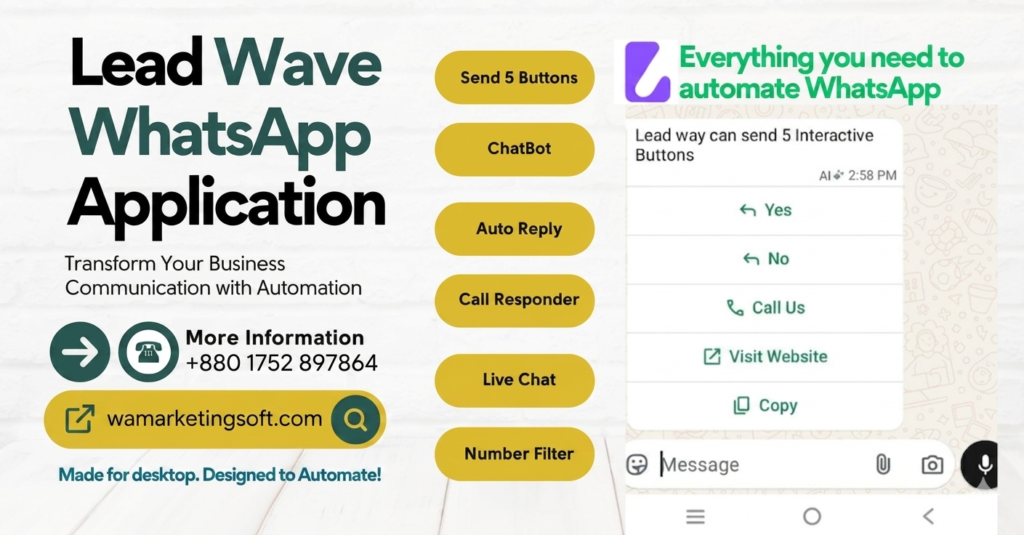
LeadWave WhatsApp Marketing Tools is a Windows desktop application that solves exactly this problem. It lets you send bulk WhatsApp messages, set up an AI-powered chatbot, manage multiple devices, and automate your entire WhatsApp marketing workflow — all from one dashboard.
In this review, we’ll cover everything you need to know: features, pricing, how it works, and whether it’s worth buying in 2026.
LeadWave v7.0.0 — What’s New in the Latest Version?
LeadWave’s latest release (v7.0.0) brings significant upgrades that make it one of the most powerful WhatsApp marketing tools available today.
✨ Enhanced in v7.0.0
- Revamped Dashboard UI — cleaner, faster, and easier to navigate
- Support Button with official company contact information
- Device recognition now enabled across all modules
- Label Export in Group Grabber (experimental)
- Improved Number Filtering accuracy
- Removed unnecessary socket reconnection reloads for smoother performance
🛠 Bug Fixes
- Fixed Contact Group Name Editing issue
- Resolved Campaign Pause issue
- All critical bugs resolved ✅
🆕 Newly Added Features
- Live Chat Module with basic CRM functionality
- Cloud-Based Licensing System for enhanced account security
- Device restrictions during license generation
- Option to disable licenses remotely when needed
LeadWave Core Features — A Deep Dive
1. Bulk WhatsApp Messaging
LeadWave’s bulk messaging engine lets you send thousands of personalized messages in one go. You can use variable tokens like {name}, {product}, or {offer} to make every message feel personal — even when you’re sending to 5,000 contacts.
Supported media types: Text, Images, PDFs, Videos, Audio
Safety features: Configurable message delays, randomized sending intervals, and anti-ban protection built in.
Why this matters: Most WhatsApp accounts get banned because of suspicious sending patterns. LeadWave’s smart delay system mimics human behavior, keeping your account safe.
2. AI Chatbot with Google Gemini Integration
LeadWave’s AI chatbot is powered by Google Gemini AI — one of the most advanced language models available. You can:
- Train the chatbot on your own product data and FAQs
- Set up automated conversation flows
- Handle customer inquiries 24/7 without any manual input
- Trigger different responses based on keywords or customer behavior
This is a game-changer for small businesses. Your chatbot works while you sleep, answers questions instantly, and never misses a lead.
3. Multi-Device Management
Running a business often means multiple WhatsApp numbers — for sales, support, different team members, or different products. LeadWave lets you connect and manage multiple WhatsApp devices from a single dashboard.
No more switching between phones or accounts. Everything is centralized.
4. Contact Management
LeadWave includes a full contact management system:
- CSV import — bulk upload your existing contact lists
- Tagging and labeling — segment contacts by category, interest, or campaign
- Filtering — target specific groups for each campaign
- Number filtering — automatically remove invalid or inactive WhatsApp numbers before sending
5. Message Templates
Create and save reusable message templates with rich media support. Include personalization tokens, images, or documents. One click to deploy — no rewriting the same message every campaign.
6. Live Chat Module (NEW in v7.0.0)
The newly added Live Chat Module brings basic CRM functionality to LeadWave. You can:
- Monitor incoming messages in real time
- Assign conversations to team members
- Track customer interaction history
- Respond directly from the dashboard
7. REST API Module
For developers and businesses with existing CRM systems, LeadWave offers a local REST API that lets you integrate WhatsApp messaging into your own workflows, websites, or automation tools.
8. Anti-Ban Protection & Number Warmer
LeadWave includes built-in protection to keep your WhatsApp accounts safe:
- Automated number warming — gradually increases message volume for new numbers
- Smart delays — randomized intervals between messages
- Session management — stable connections that don’t trigger WhatsApp flags
How to Get Started with LeadWave
Step 1: Download & Install
Download the LeadWave .exe installer from the official page and install it on your Windows 10 or Windows 11 PC.
Step 2: Copy Your License Code
After launching the app, a unique device-specific license code will appear on your screen. Copy it.
Step 3: Activate via WhatsApp
Send the license code via WhatsApp to the support number. Your trial or full license will be activated within minutes.
Step 4: Connect Your WhatsApp & Start
Scan the QR code or use pairing code to link your WhatsApp number. Import your contacts, set up your first campaign, and you’re ready to go.
LeadWave Pricing — How Much Does It Cost?
One of LeadWave’s biggest selling points is its price. Compared to official WhatsApp Business API solutions (which can cost hundreds of dollars per month), LeadWave is incredibly affordable.
| Plan | Price | Duration | Best For |
|---|---|---|---|
| 1 Year License | $5 | 1 year of updates & support | Businesses just getting started |
| Lifetime License | $10 | Lifetime updates & support | Anyone serious about growth |
What’s included in both plans:
- All core features (Bulk Messaging, AI Chatbot, Multi-Device)
- REST API Module
- Anti-Ban Protection
- WhatsApp Support
Lifetime License extras:
- Live Chat CRM Module
- Cloud-Based Licensing
- All future feature updates — forever
💡 Pro Tip: The Lifetime License at $10 is the obvious choice. You pay once and never worry about renewals. Every new feature — including v7.0.0’s Live Chat module — comes to you automatically.
Free Trial — Try Before You Buy
Not sure yet? LeadWave offers a 1-day free trial with full access to all features. No credit card required.
- Download the software
- Copy your license code
- Send it via WhatsApp to get your free trial activated
It’s the best way to test bulk messaging, the AI chatbot, and multi-device management before committing.
Why Buy From a Trusted Reseller vs. CodeCanyon?
LeadWave is originally sold on CodeCanyon, but buying through a reseller like WaMarketingSoft gives you significant advantages:
| Reseller (WaMarketingSoft) | CodeCanyon Direct | |
|---|---|---|
| Price (Lifetime) | Only $10 | Much higher |
| Update Notifications | ✅ Immediate WhatsApp alert | ❌ Check yourself |
| Direct Support | ✅ WhatsApp — personal & fast | ❌ Ticket system only |
| Video Tutorials | ✅ Full guide included | ❌ Limited |
| Activation Speed | ✅ Within minutes | ❌ Can take time |
| Software Quality | ✅ 100% original | ✅ 100% original |
The software itself is identical — 100% official. The difference is the service around it.
Who Is LeadWave Best For?
LeadWave is an excellent fit for:
- E-commerce businesses sending order updates, promotions, and abandoned cart follow-ups
- Real estate agents nurturing leads via WhatsApp
- Digital marketers running bulk campaigns for clients
- Coaches and course creators communicating with students
- Small businesses replacing expensive customer support tools with an AI chatbot
- WhatsApp marketing agencies managing multiple client accounts from one dashboard
LeadWave vs. Other WhatsApp Marketing Tools
| Feature | LeadWave | Generic Bulk Senders | WA Business API |
|---|---|---|---|
| AI Chatbot | ✅ Gemini AI | ❌ | ✅ (very expensive) |
| Bulk Messaging | ✅ | ✅ | ✅ |
| Multi-Device | ✅ | ❌ | ✅ |
| Anti-Ban | ✅ Built-in | ⚠️ Basic | ✅ |
| Live Chat CRM | ✅ NEW | ❌ | ✅ |
| Price | $5–$10 | $20–$100/mo | $200+/mo |
| Windows Desktop App | ✅ | Varies | ❌ (cloud only) |
Frequently Asked Questions
Is LeadWave safe to use?
LeadWave uses third-party WhatsApp libraries (not the official API). It includes anti-ban protection with smart delays and number warming. As long as you follow the guidelines — max 500–1,000 messages per day per device, proper delays, and opt-in contacts only — the risk is very low.
Does it work on Mac or Linux?
Currently, LeadWave is a Windows desktop application and supports Windows 10 and Windows 11 only.
What happens after my 1-year license expires?
Your software continues to work, but you won’t receive updates. You can renew for another year ($5) or upgrade to lifetime at any time.
Can I use LeadWave for my clients?
Yes. Many agencies use LeadWave to manage WhatsApp campaigns for multiple clients using the multi-device management feature.
How is payment made?
Payment is made via WhatsApp to the reseller. Accepted methods include bKash, Nagad, PayPal, Binance, and more.
Final Verdict — Is LeadWave Worth It?
Yes — especially at this price.
For $10 (lifetime), you get a fully-featured WhatsApp marketing desktop app with AI chatbot, bulk messaging, multi-device management, live chat CRM, and ongoing updates. That’s a fraction of what any SaaS alternative would cost per month.
The v7.0.0 update shows the development team is actively improving the product — new features, better UI, and critical fixes all rolled into one release.
If your business relies on WhatsApp communication and you want to stop doing everything manually, LeadWave is one of the best investments you can make.
Get Started Today
👉 Download Free Trial or Buy Now →
- ✅ 1-Day Free Trial — No credit card required
- ✅ Lifetime License from just $10
- ✅ Instant activation via WhatsApp
- ✅ Windows 10 / 11
Published by WaMarketingSoft — Authorized reseller of LeadWave WhatsApp Marketing Tools.
For support or to purchase, contact us on WhatsApp.