How to Warm Up a New WhatsApp Number Without Getting Banned — Complete 2026 Guide
If you just bought a new WhatsApp number and immediately started sending bulk messages, congratulations — your account is probably flagged or banned already.
This is the #1 mistake marketers make, and it costs them thousands in lost leads and wasted money.
The solution? WhatsApp number warming — a strategic process that tells WhatsApp’s algorithm: “This is a real, legitimate user, not a bot.”
In this guide, we’ll show you exactly how to warm up a new WhatsApp number safely, using the right tools (LeadWave Whatsapp Marketing Tools and WA Sender Software), and start sending bulk messages without any risk of ban.
Why Is WhatsApp Number Warming Critical?
Your WhatsApp account is not like a regular phone number. It has an algorithmic “trust score” inside WhatsApp’s servers.
When you create a new account, that trust score is ZERO. WhatsApp doesn’t know if you’re:
- A real person or a bot
- A legitimate business or a spammer
- Someone who will follow their terms or violate them
If you immediately start sending 500 bulk messages from a fresh account, WhatsApp’s algorithms detect this pattern instantly and flag your account as suspicious.
Result? Your number gets temporarily restricted, and within days, it’s permanently banned.
The Cost of a Banned WhatsApp Number:
- Lost customer relationships
- Disrupted marketing campaigns
- Wasted money on tools you can’t use
- Damaged reputation with clients
That’s why WhatsApp number warming is non-negotiable if you’re serious about WhatsApp marketing.
What Is WhatsApp Number Warming?
WhatsApp number warming is a gradual, strategic process of building your account’s trust score with WhatsApp’s algorithms.
Instead of:
- Creating account → Sending 500 messages (BAN)
You do:
- Create account → Gradually increase activity → Build trust → Then send bulk messages safely
Think of it like this: If you open a new bank account and immediately try to wire $1,000,000 internationally, the bank will freeze your account. But if you gradually make legitimate transactions, the bank trusts you.
WhatsApp works the same way.
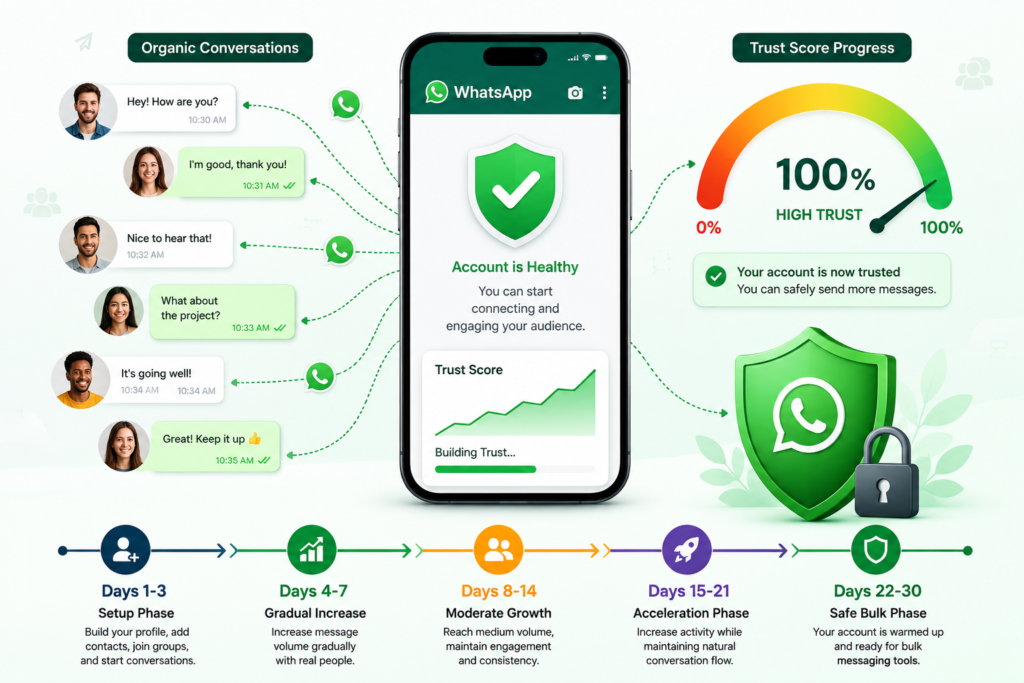
The Ideal WhatsApp Number Warming Timeline
Days 1-3: Setup Phase (Build Initial Activity)
Objective: Make WhatsApp recognize this is an active account
- Complete your profile: Add profile picture, name, bio
- Add 20-30 contacts manually: Send personal messages to real friends/family
- Join 5-10 WhatsApp groups: Active groups where you participate
- Read/receive messages: Get people to message you
- Make 5-10 phone calls: Real voice calls (not automated)
- Update your status: Post 2-3 legitimate status updates
Target: 50-100 messages sent, 20-30 received
Days 4-7: Gradual Increase Phase
Objective: Increase message volume gradually (not suddenly)
- Send 100-150 messages/day (spread throughout the day)
- Send to real contacts only (no bulk list yet)
- Personal messages + group messages (50% each)
- Include some back-and-forth conversations
- Wait 10-15 seconds between each message (no rapid-fire)
Total Week 1: 500-600 messages sent
Days 8-14: Moderate Growth Phase
Objective: Reach medium volume while maintaining legitimacy
- Increase to 300-400 messages/day
- Still personal messages (no marketing copy yet)
- Can now include some media (images, videos)
- Join 5 more groups (total 10-15 groups)
- Maintain 10-15 second delays between messages
Total Week 2: 2,100-2,800 messages sent
Days 15-21: Acceleration Phase
Objective: Reach high volume, still safe
- Increase to 500-700 messages/day
- Now you can include promotional content (but personalized)
- Send to larger contact lists (100-200 contacts)
- Use smart delays (randomized 5-20 seconds)
- Engage actively in groups
Total Week 3: 3,500-4,900 messages sent
Days 22-30: Safe Bulk Phase (READY FOR TOOLS)
Objective: Your account is now warmed up. Ready for bulk sender tools.
- Now you can use WA Sender or LeadWave software
- Safe to send 1,000+ messages/day
- Can use automated tools without ban risk
- Account trust score is established
Total Month 1: 8,000-15,000 messages sent (organically)
10 Critical Best Practices for WhatsApp Number Warming
1. Always Use Realistic Delays Between Messages
❌ Wrong: Send 100 messages in 30 seconds
✅ Right: 100 messages with 5-30 second random delays
Instant back-to-back messages are a bot signature. Real humans pause between messages.
2. Send to REAL People, Not Lists
During warming phase, don’t import Excel sheets of 1,000 random numbers.
Instead:
- Message actual friends and contacts
- Engage in group conversations
- Let people message you first, then reply
3. Include Personal, Conversational Messages
❌ Don’t send: “Hi! Special offer 50% off WhatsApp Marketing Software! Buy now!”
✅ Do send: “Hey, how are you? Haven’t seen you in a while. How’s business going?”
4. Vary Your Message Types
- Text-only messages (50%)
- Messages with emojis (30%)
- Images/media (15%)
- Voice messages (5%)
This mimics real human behavior.
5. Don’t Send Identical Messages
Every message should be slightly different, even if the core message is the same.
❌ Wrong:
Message 1: “Hi John, check this out”
Message 2: “Hi John, check this out”
Message 3: “Hi John, check this out”
✅ Right:
Message 1: “Hi John, wanted to reach out”
Message 2: “John, hope you’re having a great day”
Message 3: “Hey John, just checking in”
6. Engage in Groups Actively
Join 10-15 groups in your niche and participate genuinely. This builds legitimacy.
- Reply to others’ messages
- Start conversations
- Share valuable content
- Don’t spam the group
7. Maintain Consistent Activity Patterns
Don’t message 1,000 people on Monday, then nothing until Friday.
Real humans have daily patterns. Mimic that:
- Send messages throughout the day (not all at once)
- Be active every day (including weekends)
- Have natural peaks and valleys in activity
8. Include Back-and-Forth Conversations
The best warming happens when people reply and you reply back.
This signals to WhatsApp that your account is generating real engagement.
9. Never Use Auto-Clickers or Bot Simulators During Warming
Some people try to “fake” warming with automated clickers. This backfires.
WhatsApp detects unnatural input patterns instantly.
Do it manually or use legitimate warming tools.
10. Avoid Spam Trigger Words During Warming Phase
Words that trigger WhatsApp’s spam filter:
- “Click here”
- “Limited time offer”
- “Buy now”
- “Congratulations you won”
- “100% free”
- Dollar signs ($$, $$$)
- “Guaranteed”
After 30 Days: Your Account Is Ready — Now Use LeadWave or WA Sender
Once your account is warmed up (day 30+), you can safely use professional WhatsApp marketing software.
Two tools we recommend:
Option 1: LeadWave Whatsapp Marketing Tools
LeadWave is the most advanced WhatsApp marketing automation platform in 2026.
LeadWave Key Features:
- AI Chatbot: 24/7 customer engagement (responds to messages automatically)
- Bulk Messaging: Send 1,000s of personalized messages instantly
- Multi-Device Management: Control unlimited WhatsApp accounts from one dashboard
- Number Warmer: Built-in warming feature for new accounts
- Smart Filter: Automatically removes invalid numbers (prevents bans)
- Drip Campaigns: Automatic follow-up sequences
- Live Analytics: Real-time tracking of all metrics
Price: $15 Lifetime (one-time payment)
Best for: Agencies, businesses wanting full automation, resellers
👉 Get LeadWave: https://wamarketingsoft.com/leadwavewhatsapp
Option 2: WA Sender Software
WA Sender is the #1 WhatsApp bulk sender in Bangladesh with 1,500+ active users.
WA Sender Key Features:
- WhatsApp Warmer: Gradually increase volume (anti-ban protection)
- Bulk Contact Sender: Upload Excel, send personalized messages
- Group Sender: Send to entire groups with one click
- Google Maps Extractor: Automatically extract business leads
- Auto-Responder Bot: 24/7 automated replies
- Number Filter: Remove invalid numbers before sending
- Campaign Scheduler: Set messages to send at specific times
Price: ৳500-1,500 Lifetime (one-time payment)
Best for: Small businesses, freelancers, lead generators, budget-conscious marketers
👉 Get WA Sender:https://wamarketingsoft.com/wa-sender/
LeadWave vs WA Sender: Which Is Right For You?
Choose LeadWave If You:
- Need advanced automation and AI chatbot
- Manage multiple WhatsApp numbers/clients
- Want 24/7 automated customer responses
- Building a SaaS platform or agency service
- Need multi-device management
Choose WA Sender If You:
- Starting out with WhatsApp marketing
- Have a tight budget
- Focus on bulk messaging and lead generation
- Need simple, straightforward functionality
- Want to use locally (built by Bangladeshi team)
Real-World Example: How Rahman Warmed His Number & Started Earning
Rahman is an e-commerce business owner in Dhaka. He wanted to start WhatsApp marketing to his customers.
What He Did (30-Day Warming):
Week 1: Sent 300+ personal messages to existing customers
Week 2: Joined 15 WhatsApp groups in his niche, sent 100+ messages
Week 3: Gradually increased to 500+ messages/day, including promotional content
Week 4: Account fully warmed, ready for bulk sending
FAQ: WhatsApp Number Warming
Q1: Can I skip the warming process?
No. If you skip warming, your number will be banned within days. Not worth the risk.
Q2: How long does warming take?
Minimum 30 days. Some people extend to 45 days for extra safety.
Q3: Can I warm multiple numbers simultaneously?
Not recommended. Focus on one number at a time. Once that’s warmed, you can start a second.
Q4: What if my number gets flagged during warming?
Stop all activity immediately. Wait 7 days without sending messages. Then resume more gradually.
Q5: How do I know my account is fully warmed?
If you’ve sent 500-1000 messages organically over 30 days with zero issues, you’re warmed.
Q6: Do LeadWave and WA Sender help with warming?
Both have built-in anti-ban protection. WA Sender has a specific “Number Warmer” feature.
But initial manual warming is still necessary.
Conclusion: Patience Now = Freedom Later
WhatsApp number warming feels slow. 30 days feels long when you’re eager to start marketing.
But this patience is what separates successful marketers from those who get their numbers banned.
Once your account is warmed, you can:
- Send 500+ messages/day safely
- Use automation tools without fear
- Build a predictable lead generation system
- Earn recurring income from WhatsApp marketing