Every week, someone messages us with the same story. They bought bulk messaging software, loaded up a contact list, hit send on two thousand messages, and by the next morning their number was gone. Blocked. Sometimes it was their main business line — the one printed on their van, their business cards, their shopfront window.
The software worked exactly as advertised. That was never the problem. The problem was that nobody explained how WhatsApp actually decides who gets banned, and by the time they found out, the damage was permanent.
This guide is the explanation we wish every one of those people had read first. It covers how WhatsApp’s detection systems work, the specific behaviours that trigger bans, a practical warming schedule for new numbers, and what to do if you have already been restricted.
We sell WhatsApp marketing software. We would still rather you send fewer messages safely than lose your number sending too many.
Why WhatsApp bans numbers in the first place
WhatsApp handles well over a hundred billion messages a day. At that volume, the platform cannot manually review complaints, so enforcement is almost entirely automated. Systems watch for behavioural patterns that correlate with spam and act on them without human involvement.
This matters more than most people realise, because it means the system is not evaluating whether your message is useful. It has no opinion on your product, your offer, or whether your customers genuinely wanted to hear from you. It observes patterns, compares them against what spam typically looks like, and responds.
A legitimate business sending genuinely welcome order updates can absolutely get banned if the sending pattern looks mechanical. Conversely, a slightly spammy campaign sent slowly to people who engage with it may pass unnoticed. The behaviour is what gets measured, not the intent behind it.
What the system is actually watching
Based on documented WhatsApp policy and widely observed patterns across the industry, several signals appear to carry significant weight:
Message velocity. How many messages leave your number, and how quickly. Human conversation has natural irregularity — pauses, bursts, gaps. Software sending one message every three seconds, for hours, does not.
Recipient response rate. This is the signal most people underestimate. If you send five hundred messages and receive four replies, that ratio itself is a spam indicator. Real conversations generate replies. Broadcasts to uninterested strangers do not.
Block and report rate. When recipients tap “Block” or “Report spam”, that feeds directly into your number’s standing. A handful of reports across a large campaign is survivable. A concentrated burst is not.
Account age and history. A number registered three days ago that immediately sends a thousand messages behaves nothing like a real user. An established number with months of normal two-way conversation has earned a degree of trust.
Contact reciprocity. Messaging people who have never saved your number, never messaged you, and have no prior relationship with you is a strong signal. Messaging people who have contacted you first is a weak one.
Content repetition. Identical text sent to hundreds of recipients is trivially easy to detect. Varied, personalised content is far harder to fingerprint.
None of these operates as a hard threshold you can precisely calculate. They combine into an overall risk assessment, which is why two businesses sending similar volumes can experience completely different outcomes.
The three levels of WhatsApp restriction
Not every enforcement action is permanent, and understanding the difference tells you how much trouble you are actually in.
Temporary restriction
You can receive messages but cannot send them, usually for somewhere between a few hours and a couple of days. This is the platform’s warning shot. It typically follows a sudden spike in sending activity or an early cluster of spam reports.
If this happens, stop all automated sending immediately. Do not switch to a different tool and continue. Do not attempt to work around it. Use the number normally — real conversations with real people — for at least a week before considering any campaign activity again.
Most people who get permanently banned received a temporary restriction first and ignored it.
Account ban with appeal option
Your account is blocked, but WhatsApp offers a review request. Appeals do sometimes succeed, particularly for first offences on established accounts with genuine business use.
When appealing, be straightforward. Explain what your business does, describe how you obtained the contacts you messaged, and state what you will change. Automated-sounding appeals and obvious templates rarely help. If you genuinely believe the restriction was mistaken, say so plainly and explain why.
Permanent ban
The number is finished. No appeal, no recovery. This generally follows repeated violations, extremely high complaint volumes, or continued sending after earlier warnings.
At this stage the number cannot be reused for WhatsApp, and in some cases attempting to register it again simply fails. This is why the single most important rule in this entire guide is the one people most often ignore: never run bulk campaigns from your primary business number.
Number warming: the step almost everyone skips
If you take only one practical technique from this guide, make it this one.
Number warming means gradually building a new number’s activity from nothing to full campaign volume over several weeks. The purpose is to establish a behavioural history that looks like a real person using WhatsApp normally, before that number ever sends anything resembling a campaign.
Skipping this step is the single most common cause of early bans. A brand-new number that sends five hundred messages on day one has no history, no established pattern, and no accumulated trust. It looks exactly like what a spammer would do, because it is exactly what a spammer would do.
A practical 30-day warming schedule
Days 1–3: Establish the account properly
Set up a complete profile — real business name, a genuine profile photo, a proper description. Empty profiles are themselves a mild risk signal.
Send no more than five to ten messages per day, and only to people you actually know: colleagues, friends, family, existing customers who will reply. The goal is genuine two-way conversation. Reply to what they send back. Have real exchanges.
Join one or two WhatsApp groups if that fits naturally with your business. Normal accounts do this.
Days 4–7: Slow expansion
Increase to twenty or thirty messages per day. Continue prioritising conversations that generate replies. Mix message types — send an image, share a document, record a short voice note. Real users do not send text exclusively.
Vary your active hours. Messages leaving a number at precisely regular intervals throughout the day is not how humans behave.
Days 8–14: Building volume
Move to fifty or eighty messages daily. You can now begin including customers who have previously contacted you, though the priority remains on exchanges that produce responses.
Keep delays generous. At this stage, thirty to sixty seconds between messages is appropriate.
Days 15–21: Approaching campaign volume
Increase to somewhere between one hundred and two hundred messages daily. You can begin sending to opt-in contacts who have not yet messaged you first, but keep these messages personalised and clearly relevant.
Watch your response rate carefully. If replies drop sharply, slow down rather than pushing forward.
Days 22–30: Full operational volume
Move toward three hundred to five hundred messages daily. By now the number has a month of varied, responsive history behind it.
After day 30, treat five hundred to one thousand messages per day per number as your working ceiling. Software will happily send more. That does not make it wise.
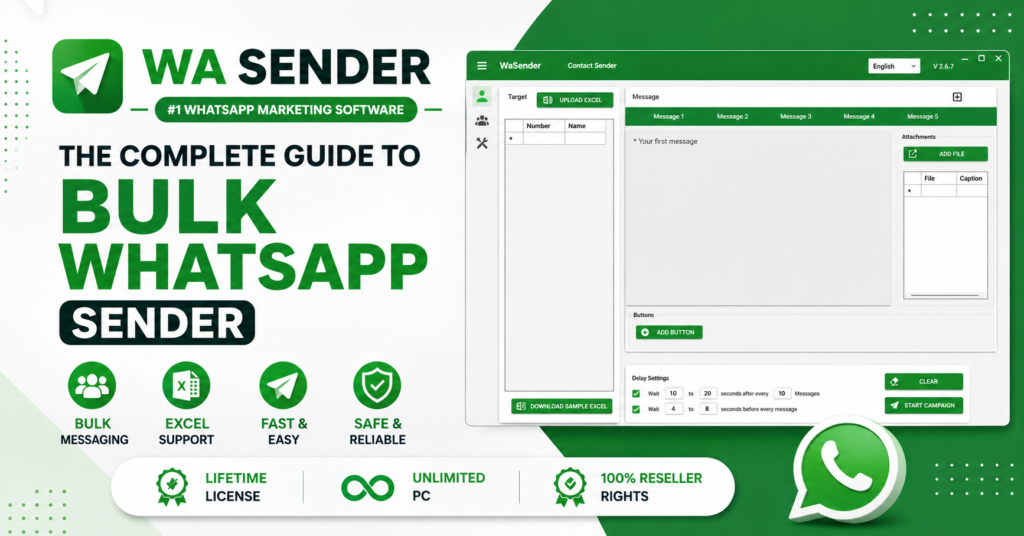
Both WA Sender and LeadWave include built-in number warming features that automate parts of this schedule, gradually increasing volume and randomising send patterns. The automation helps considerably, but it does not replace the fundamental requirement of time. A number cannot be warmed in an afternoon regardless of what tool you use.
The ten rules that actually prevent bans
1. Never use your main business number
This is worth repeating because it is the mistake with the most severe consequences. Use a dedicated number for campaigns. If it gets restricted, you have lost a SIM card rather than the contact number your entire customer base has saved.
2. Message only people who opted in
“Opt-in” means the person agreed to receive messages from you. A purchased list is not opt-in. Numbers scraped from a directory are not opt-in. A stranger who has never heard of your business is not opt-in.
Legitimate opt-in comes from customers who bought from you, people who filled in a form requesting contact, visitors who clicked a “message us on WhatsApp” button, or contacts who explicitly agreed to receive updates.
This single rule affects your ban risk more than any technical setting, because it directly determines your block and report rate — which is the signal WhatsApp weights most heavily.
3. Keep meaningful delays between messages
Twenty to forty seconds minimum, randomised rather than fixed. Software that sends every twenty-two seconds exactly is nearly as detectable as software that sends every two seconds.
Randomisation matters as much as duration. Genuine irregularity — sometimes eighteen seconds, sometimes fifty-three — resembles human behaviour far more closely than any consistent interval.
4. Personalise every message
Sending identical text to five hundred people is one of the easiest patterns to detect. Personalisation tokens that insert names, company names, or other contact-specific details make each message distinct.
Better still, vary the message structure itself. Prepare three or four versions of the same message with different phrasing and rotate between them.
5. Include a clear opt-out in every message
A simple line — “Reply STOP to unsubscribe” — costs you almost nothing and converts a potential spam report into a quiet removal. Someone who can easily leave usually will not bother reporting you.
This is also increasingly a legal requirement in many jurisdictions, so it protects you on two fronts at once.
6. Respect time zones and reasonable hours
Messages arriving at 3am generate complaints at a much higher rate than the same message arriving at 11am. Schedule campaigns for reasonable local hours, and check where your recipients actually are before sending.
7. Monitor your response rate as a health metric
Track replies per hundred messages sent. If that figure falls below roughly five percent, your list quality is poor and your ban risk is climbing regardless of your technical settings.
A low response rate means you are messaging people who do not want to hear from you. No amount of clever delay configuration fixes that underlying problem.
8. Avoid obvious spam trigger words
Certain phrasing patterns are strongly associated with spam: excessive capitals, multiple exclamation marks, urgency language like “ACT NOW” or “LIMITED TIME ONLY”, claims about guaranteed income, and shortened links from unfamiliar domains.
Write the way you would to an individual customer, not the way a mass-marketing email is written.
9. Clean your contact list before every campaign
Invalid numbers, disconnected lines, and numbers not registered on WhatsApp all generate failed sends, and a high failure rate is itself a risk signal.
Both WA Sender and LeadWave include number filtering that validates contacts before sending. Running this check takes minutes and meaningfully reduces failure rates.
10. Spread volume across multiple numbers
Rather than pushing a single number to its limit, distribute campaigns across several warmed numbers. Three numbers each sending three hundred messages carries substantially less risk than one number sending nine hundred.
Both WA Sender and LeadWave support multi-account management, making this practical to operate from a single dashboard.
Understanding the tool you are actually using
There is an important distinction that affects everything discussed above.
QR-based software — including WA Sender and LeadWave — connects to your number the same way WhatsApp Web does, by scanning a QR code. It is affordable, requires no approval, typically costs a one-time licence fee, and includes capabilities like Google Maps lead extraction that the official API does not offer.
It also operates outside WhatsApp’s official Terms of Service, which is precisely why every technique in this guide matters. The ban risk is real, and the safety practices are what keep it manageable.
The Official WhatsApp Cloud API registers your number directly with Meta. There is no ban risk in the sense discussed here, because the connection is sanctioned. You can earn verified business status, multiple team members can handle one number simultaneously, and you are not dependent on a phone staying online.
The trade-offs are cost and constraint. You pay per conversation, rates vary by country, a payment method is mandatory, and messaging limits start low — typically around 250 conversations for a newly verified number — before scaling upward in tiers as your quality rating holds.
Neither option is universally correct. A small business testing whether WhatsApp marketing works at all is usually better served by QR-based software with careful practices. An established brand where credibility is central, or a team that needs several agents on one number, is usually better served by the official API.
Many businesses eventually run both — QR software for lead discovery and cold outreach, the official API for order confirmations and customer service where verification matters.
What to do if you have already been restricted
Stop sending immediately. Do not switch tools and continue from the same number. Do not attempt workarounds. Continued activity after a restriction is the fastest route from temporary to permanent.
Identify what triggered it. Was volume too high? Was the list purchased rather than opted in? Was the number too new? Were you sending at unreasonable hours? Being honest at this stage determines whether the same thing happens again.
Use the number normally for at least a week. Real conversations with real people who reply. This rebuilds legitimate activity history.
Appeal if the option is available. Explain your business plainly, describe how you obtained the contacts, and state specifically what you will do differently.
Restart warming from the beginning. If the number recovers, do not resume at previous volumes. Treat it as a fresh number and work through the full warming schedule again.
If it is permanent, learn the lesson rather than repeating it. Get a new number, warm it properly, and apply the practices in this guide from day one. Buying a new SIM and immediately repeating the same behaviour simply produces the same outcome a second time.
Frequently asked questions
How many WhatsApp messages can I send per day without getting banned?
For a properly warmed number, one hundred to Two hundred per day is a widely used working ceiling. New numbers should stay far below this and build gradually over roughly thirty days. No exact number is officially published, and the safe limit depends heavily on your response rate and complaint rate rather than volume alone.
Does using bulk messaging software automatically get you banned?
No. Bans result from behavioural patterns, not from the existence of software. Many businesses use these tools for years without problems by warming numbers properly, messaging opt-in contacts, and keeping volumes moderate. The tool does not cause bans; how it is used does.
Can a banned WhatsApp number be recovered?
Temporary restrictions usually lift on their own within hours or days. Bans with an appeal option are sometimes reversed, particularly for first offences on established accounts. Permanent bans cannot be reversed, and the number generally cannot be reused.
Is the Official WhatsApp API completely ban-proof?
It removes the ban risk associated with unofficial access, since the connection is Meta-approved. However, accounts can still face restrictions for policy violations such as repeated spam complaints or prohibited content. It removes one category of risk rather than all risk.
How long does number warming take?
Roughly thirty days to reach full campaign volume safely. Some businesses compress this to two weeks with careful monitoring, but shorter schedules carry higher risk. Numbers warmed over longer periods consistently perform more reliably.
Do delays between messages really matter?
Substantially. Velocity is among the clearest signals distinguishing automated sending from human conversation. Twenty to forty second randomised delays are a reasonable baseline, with randomisation being as important as duration.
Should I use my personal number for business campaigns?
No. Use a dedicated number that is not printed on your marketing materials or saved by your existing customers. If it is restricted, the loss is contained.
Does a verified business badge prevent bans?
Verification improves trust signals and raises messaging limits, but it does not exempt an account from policy enforcement. Verified accounts sending genuine spam still face consequences.
The honest summary
WhatsApp bulk messaging works. Businesses generate real revenue from it every day, at scale, without losing numbers. The ones who succeed are not using different software from the ones who fail — they are using it differently.
The pattern among businesses that lose numbers is remarkably consistent: a new number, a purchased list, high volume on day one, minimal delays, identical messages, and no opt-out. Almost every ban we hear about involves several of these simultaneously.
The pattern among businesses that operate for years without trouble is equally consistent: dedicated numbers warmed over weeks, opt-in contacts only, moderate daily volumes, randomised delays, personalised content, and a genuine willingness to slow down when response rates drop.
The difference is not luck, and it is not the tool. It is patience.
If you are choosing software, we cover both approaches in detail — including which one suits which type of business — in our WhatsApp marketing software comparison. Both WA Sender and LeadWave include the number warming, smart delay and filtering features described throughout this guide.
If you would rather talk it through before deciding, message us directly on WhatsApp. We will tell you honestly which approach fits your situation — including the times when the cheaper option is the better one.
Published by WaMarketingSoft. We supply WhatsApp marketing software to businesses in over thirty countries, and we would rather our customers keep their numbers than send more messages this month.